

New Vendor Onboarding Process: Ready for the First Invoice
A completed vendor form is not the same as a supplier ready for invoice processing. Build an onboarding workflow with explicit handoffs, payment controls, and a first-invoice acceptance test.
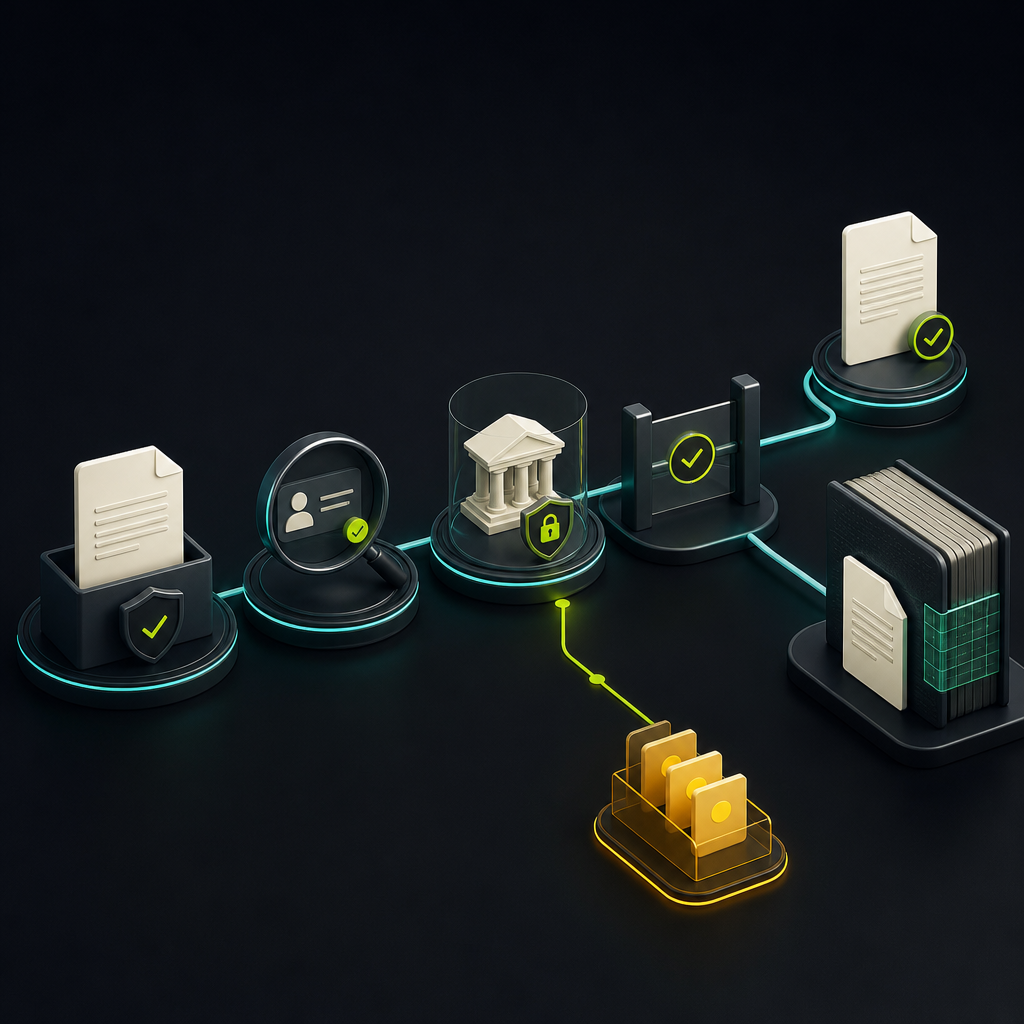
The new vendor onboarding process is the controlled workflow for collecting supplier information, verifying identity and payment details, completing required reviews, and activating a vendor record in the accounting system. For accounts payable, it should also establish how the supplier’s first invoice will be matched, approved, and paid.
The practical sequence is: approve the request, collect information securely, validate the supplier, verify payment instructions, complete approvals, synchronize the record, and confirm invoice readiness. The important distinction is between information received and permission to transact.
For finance teams comparing automation options, that distinction is a useful buying criterion. A portal can eliminate email attachments while leaving AP to resolve missing purchase orders, inconsistent supplier names, and disconnected payment holds.
Define completion before designing the workflow
PaymentWorks describes supplier onboarding as collecting, verifying, and approving the information needed to work with a supplier. Translate that broad definition into explicit permissions rather than a single “Active” checkbox.
A practical design separates:
- Approved to purchase: the business relationship and relevant commercial requirements are approved.
- Ready for invoice processing: the supplier has a recognized record, submission instructions, and a defined approval route.
- Eligible for payment: required tax, compliance, and payment-account checks are complete, with no applicable holds.
These permissions need not become separate software statuses, but the underlying controls must remain distinct. Recording an invoice or liability should not automatically authorize payment.
A new vendor onboarding process with clear handoffs
Assign an owner and an exit condition to each stage. “Sent to finance” is a routing event, not evidence that a control passed.
| Stage | Accountable function | Exit condition | Unresolved issue |
|---|---|---|---|
| Request authorization | Business owner or procurement | Business need and sponsor confirmed | Return to requester |
| Secure intake | Vendor and AP operations | Required information submitted | Request missing fields |
| Identity and risk review | Assigned risk owners | Checks resolved and documented | Route for specialist review |
| Payment verification | Authorized verifier | Payment instructions verified | Keep payment hold |
| Activation approval | Designated approver | Required approvals recorded | Block activation |
| System synchronization | Master-data or integration owner | Destination record acknowledged | Queue integration exception |
| Invoice-readiness check | AP and business owner | Invoice route and terms confirmed | Resolve before first submission |
Authorize the supplier request before collecting sensitive data
Start with an internal sponsor, purchasing entity, business purpose, expected payment currency, and intended purchasing route. Search existing supplier records before issuing an invitation.
A similar name should trigger review, not an automatic merge. A supplier may have multiple legal entities or legitimate remit-to arrangements. Record whether the request creates a new relationship, adds an entity, or extends an existing record.
Collect information through conditional intake
Ask for legal identity, addresses, tax status, contacts, payment preferences, and applicable supporting documents. Separate the commercial contact from the person authorized to confirm banking instructions.
Conditional forms should reflect supplier type, jurisdiction, and services provided. A domestic consultant and an overseas manufacturer should not receive an identical document checklist. A self-service vendor portal provides an intake channel; it does not, by itself, establish that submitted information is genuine.
For a US payer’s workflow, Stampli’s US onboarding document overview identifies tax documentation and payment details as core inputs. Generally, request Form W-9 from US persons where appropriate and determine the applicable W-8-series form for foreign payees. The correct form and withholding treatment depend on the payee and payment; refer exceptions to the tax owner rather than routing solely by bank country.
Validate identity and assign risk reviews
Check required fields, document consistency, and possible duplicates. Distinguish formatting checks from verification: a correctly structured tax ID does not prove that it belongs to the submitting business.
Gigapay’s discussion of KYC and KYB for vendor onboarding emphasizes establishing the payee’s identity before admitting it to the master file. Apply the depth of review according to relevant legal requirements and your risk policy. Ordinary corporate procurement does not automatically carry every obligation imposed on a regulated payment provider.
Assign separate owners for sanctions questions, security review, insurance, or ownership checks when applicable. AP can coordinate the workflow without becoming the default decision-maker for every risk category.
Verify payment instructions independently
Do not treat an emailed bank letter or uploaded document as conclusive proof of account ownership. Use supported account-verification services where available and independently authenticated confirmation when necessary. Record what each method actually establishes: account existence, access, name correspondence, or ownership evidence.
For callbacks, use a trusted number obtained independently of the payment instruction being verified. Where verification coverage is limited, document the alternative procedure and authorized reviewer. Keep payment blocked until the required checks are resolved.
Approve and synchronize without losing control state
Separate the ability to edit sensitive payment fields from the authority to approve them. Link approval to the reviewed record version; a later bank-detail edit should not inherit approval from an earlier submission.
When assessing ERP and accounting integrations, require evidence that the destination accepted the record. Sending a successful API request is not enough if the accounting system rejected a required field or created a duplicate.
Define which system owns each field, how holds propagate, and how retries avoid duplicate creation. An integration failure should enter an owned exception queue, not silently convert into a manually rekeyed vendor.
Make the first invoice the acceptance test
A supplier can pass every onboarding review and still submit an invoice AP cannot process. Before closing the onboarding task, confirm:
- The correct buying entity and supplier legal name.
- The invoice submission channel and required references.
- Whether a purchase order is mandatory.
- The receipt or service-acceptance owner.
- The non-PO approval route, where permitted.
- The agreed currency, payment terms, and remittance contact.
Send these instructions to the supplier and retain them with the onboarding record. This is an upstream prerequisite for touchless invoice processing: invoice capture cannot reliably compensate for an undefined purchasing route.
Hypothetical example: an approved supplier with no invoice route
A consulting supplier completes identity and banking checks. Procurement approves the engagement, but nobody assigns the service-acceptance owner. The supplier’s first invoice arrives without a PO, and AP begins an email search for an approver.
The problem is not missing supplier documentation. It is an incomplete handoff. An invoice-readiness gate would require either the PO reference or an approved non-PO route before onboarding closes, while preserving the ability to record an invoice received earlier.
Test automation with exceptions, not just a clean application
Ask shortlisted providers to demonstrate the process using controlled test records. Evaluate the outcome and audit evidence, not just whether a screen displays an alert.
- Possible duplicate: Submit an existing supplier under a trading name. Confirm that review prevents accidental duplicate activation without merging distinct entities.
- Changed banking details: Edit payment instructions after approval. Confirm that relevant payment eligibility is suspended pending re-verification.
- Unresolved review: Leave a required risk check open. Confirm that another approver cannot accidentally bypass it.
- ERP rejection: Trigger a validation failure. Confirm that the portal does not report successful activation and that retrying does not create another record.
- Early invoice: Submit an invoice before payment clearance. Confirm that AP can capture the obligation while payment remains blocked.
Automation can route requests, extract fields, chase missing documents, and prepare exceptions for review. AI-generated suggestions should not substitute for evidence of bank ownership or bypass assigned approval authority. Also ask which checks require third-party services, additional fees, or manual fallback procedures.
Measure readiness without hiding the backlog
Track request-to-invitation time, supplier completion time, internal review time, and synchronization time separately. Otherwise, a single onboarding average conceals whether delays belong to the supplier, AP, a specialist reviewer, or the integration.
Pair speed with quality: first invoices processed without onboarding-related intervention, records returned for correction, unresolved payment holds, and aged open requests. Define the denominator for each metric. Reporting only completed applications can make performance appear better while difficult cases accumulate.
Carry the same controls into material changes after activation. New payment instructions, ownership changes, and expired required documents should trigger the appropriate re-review rather than leaving the original approval untouched.
Start with one workflow you can prove
Map a representative supplier type from internal request through its first invoice. Assign every handoff, define each hold, and run the exception tests before expanding automation.
When evaluating Payouts.com AP Automation, use that workflow to assess how invoice capture, approvals, and payment fit together. The goal is not simply fewer onboarding emails. It is a supplier record that supports reliable invoice processing without weakening payment controls.
Created with AI assistance. Sources are linked in the article; this content is general information, not legal, tax, or financial advice.
Related resources

Touchless Invoice Processing: What It Really Means and How to Get From 0% to 80%+
Touchless invoice processing isn't a switch you flip — it's a rate you climb. Here's what it really means, how to measure it, and a step-by-step path from 0% to 80%+.

J.P. Morgan AI Invoice Reconciliation in the Philippines: What AP Buyers Should Verify
J.P. Morgan’s Philippine announcement signals investment in AI-assisted invoice matching, not proof of a complete invoice-to-pay replacement. Here is how finance teams should separate reported capabilities from the workflow they actually need.
Supplier Payment Terms: Negotiate, Govern, and Automate
Supplier payment terms are a commercial agreement, not just a due-date field. Learn how to negotiate workable terms and preserve them through invoice capture, approvals, and payment.
Run your entire money cycle on one ledger
Global payouts, AP/AR automation, and AI agents with their own wallets and spend limits.
Get started
Discussion
0 commentsBe the first to join the discussion.